
Inesoft Address Book2.0 - Download
You'll be able to download in few seconds.
Publisher Description
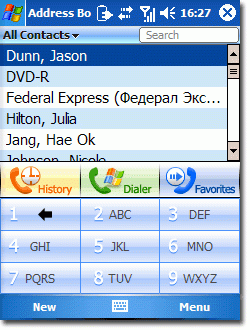
Inesoft Address Book the most convenient way to manage contacts on PocketPC and Windows Mobile 5 device.
Inesoft Address Book is fully compatible with the Outlook standard database. That means you can immediately access your data after Inesoft Address Book installation and get much more: unlimited phone numbers, addresses, add new data fields missing in the standard database, create new contact form template and much more.You can change sorting and grouping contacts by company or category. Choose between two line with picture, or just name list views, show or hide contact detail preview window.
The search system processes the whole database including notes, not only names. So you can use any detail you can remember to find the contact or a group of contacts filtered by city, company, country, etc.
Large buttons of the ABC Bar are convenient for fingertip and work like the T9 system*. You do not have to press the button a few times to type a second or third letter, but just once. Inesoft Address Book search system will process all combinations and will momentary give you the exact result.
About Inesoft Address Book
This PIMS & Calendars program is available in English, German, Russian. It was last updated on 29 September, 2026. Inesoft Address Book is compatible with the following operating systems: Other, Windows-mobile.
The company that develops Inesoft Address Book is Inesoft. The latest version released by its developer is 2.0.
The download we have available for Inesoft Address Book has a file size of 1.0 MB. Just click the green Download button above to start the downloading process. The program is listed on our website since 2007-10-25 and was downloaded 0 times. We have already checked if the download link is safe, however for your own protection we recommend that you scan the downloaded software with your antivirus. Your antivirus may detect the Inesoft Address Book as malware if the download link is broken.
How to install Inesoft Address Book on your Windows device:
- Click on the Download button on our website. This will start the download from the website of the developer.
- Once the Inesoft Address Book is downloaded click on it to start the setup process (assuming you are on a desktop computer).
- When the installation is finished you should be able to see and run the program.
Program Details
System requirements
Download information
Pricing
Version History
version 2.0
posted on 2007-10-25
Disclaimer
External Download
We do not host Inesoft Address Book on our servers. We did not scan it for viruses, adware, spyware or other type of malware. This app is hosted by the software publisher and passed their terms and conditions to be listed there. We recommend caution when installing it.
The external download link for Inesoft Address Book is provided to you by apps112.com without any warranties, representations or guarantees of any kind, so access it at your own risk.
If you have questions regarding this particular app contact the publisher directly. For questions about the functionalities of apps112.com contact us.
